Vibecoding tools: how a beginner writes code with AI
Four kitchens, one cook - and where you stand at the stove
Chatbots, AI editors, terminal agents and site builders - which vibecoding tool should a beginner pick, and how do they actually differ. No fluff.
What vibecoding tools are, in plain words
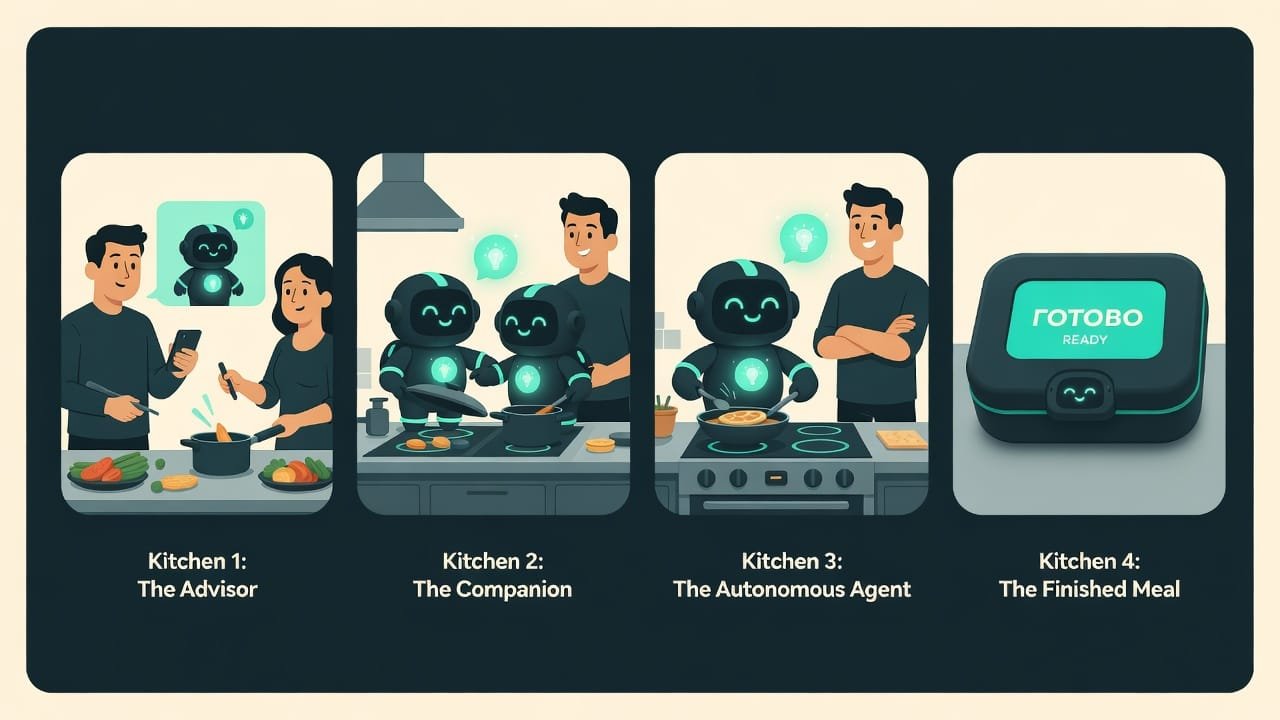
You’re about to make dinner. There are a ton of ways to do it. You can call your chef friend and ask step by step: “okay, what now?” He’ll guide you, but you’re the one doing all the work. You can hire a cook to come right into your kitchen - he sees your ingredients, your pots, and cooks beside you, shoulder to shoulder. Or you can order a ready-made kit: everything’s already chopped, all you do is press a button.
It’s exactly the same with vibecoding tools. The AI inside is almost always the same capable cook. The only question is which kitchen he’s standing in and what he’s allowed to touch.
Why a beginner should understand the types of tools
The classic beginner mistake is to grab the first tool you see (usually just a chat) and try to do absolutely everything in it. That’s like peeling potatoes with a hammer. Technically possible. But painful and slow.
Once you understand which tools even exist, here’s what happens:
- you don’t overpay for something complex where something simple would have done;
- you don’t suffer in a simple tool when it’s long past time for a serious one;
- you pick for the task - a page with grandma’s recipe and an online store are two different universes;
- you don’t panic about moving up to the next level once you’ve grown into it.
Good news: switching between tools is easy. You lose nothing. The skill of giving the AI a task moves with you anywhere.
The four types of vibecoding tools: how they differ
Picture four shelves in a store. Everything you’ll run into from here on lands on one of them. Memorize the shelves and you’ll stop getting lost.
1. AI chatbots - your chef friend on the line
This is a chatbot A chatbot is a window where you type a message and the AI answers in text. It hands you code as text too, and you copy it wherever you need it yourself. : you type, it replies. The most familiar format. You ask “make me a button” - you get a chunk of code - you copy it over. But here’s the catch: the AI doesn’t see your whole project. It sees exactly what you pasted into the window. And not one byte more.
It’s that chef friend on the phone. Great advice, but he can’t see your kitchen and won’t move your pots for you.
2. AI code editors - a cook in your kitchen
This is a program where you build your site or app, and the AI already lives inside it. The key difference from a chat: it sees your files. You say “fix this page right here” - and it finds the right spot itself and suggests an edit. All that’s left for you is to hit “accept.”
The cook is no longer on the phone. He’s standing next to you, he sees your ingredients, and he works with his own hands alongside you. See the difference?
3. Terminal agents - a cook who cooks on his own
A step up: the agent An agent is an AI that’s been allowed to act on its own: read files, write code, run commands, check the result and fix mistakes - without you pressing every button. . You set the task in words - and from there it reads the project itself, writes the code, runs the checks, catches an error and fixes it without you. Here you’re no longer the doer. You’re the conductor.
This is the cook you told “make dinner for four” - and then walked out the door. He’ll pick the recipe, chop, fry and set the table himself. Powerful? Very. But it takes a bit more trust, too. Learn to set clear tasks first, or dinner might turn out to be a surprise - and not always a pleasant one.
4. AI site builders - the ready-made kit
Here you might not see the code at all. You type “I want a site for a bakery with a menu and an order form” - and you get a finished site you tweak with your mouse and your words. There’s code under the hood somewhere, of course. It just stays out of sight.
That’s the ready-made kit: pretty, fast, no headache. But the moment you want something truly your own, something off the beaten path - the kit starts to feel cramped.

How to pick a vibecoding tool for your task
So you don’t drown in options, here’s an honest little table. There are no “bad” tools here at all. There are tools that fit and tools that don’t - for you, specifically, right now.
- Chatbot - you’re just starting out, you want to understand things and grab a small piece of code.
- AI editor - you already have a project across several files and copying by hand has you grinding your teeth.
- Agent - the task is big, you can describe it clearly in words and you’re ready to check the result.
- Builder - you need a site fast and pretty, and you’re in no mood to dig into code yet.
- Chatbot - the project has grown and you’re drowning in endless copy-paste back and forth.
- AI editor - you just need a couple of answers to a question, not a whole project.
- Agent - you haven’t learned to frame a task clearly yet: it’ll charge off and do everything at once, its own way.
- Builder - you need something really off-template that the kit just doesn’t have.
A real-life example: which tool to pick for a one-page portfolio site
Masha wants a portfolio site for her nail business: photos of her work, prices, and a “book me on Telegram” button. She doesn’t know code and doesn’t want to. And that’s completely fine.
What does a beginner usually do? Opens a chat, asks it to “write me a site,” gets a wall of code - and freezes. Because it’s not clear where any of this goes. An hour gone, mood at zero, still no site.
So what’s the smart move? A terminal agent is total overkill for Masha here - it’s like calling in a construction crew to hang a single shelf. An AI builder is plenty, where everything gets tweaked with the mouse and words. And a good way to start is to ask any AI tool like this:
Help me choose a tool. I’m a beginner, I don’t know code.
I want: a simple one-page portfolio site - photos of my work,
a pricing block, and a button to book me on Telegram.
Tell me: what’s easier for me to use - a chat, an AI editor, an agent,
or a site builder. Explain why in plain words and give me
the first step to start with today.
Common beginner mistakes when choosing a tool
- Doing everything in one chat. For a quick question - brilliant. For a whole project - you’ll be up to your ears in copy-paste.
- Jumping straight to an agent. A powerful tool in clumsy hands wrecks things faster than you can blink. Grow into it first.
- Thinking the tool matters more than the task. The fanciest agent won’t save you if you can’t explain what you want.
- Being afraid to try. A chat and a builder can’t be broken. Poke, break, experiment - it’s free experience with no consequences.
- Getting stuck on one shelf. Outgrown the chat? Move on. The tool should grow with you, not hold you back.
TL;DR - если коротко
- There are only four kinds of tools: chatbots, AI editors, terminal agents and site builders.
- It’s not about how “smart” the AI is. It’s about how much it can see and what it is allowed to do with its own hands.
- Just starting? Go with a chatbot or a web builder. No matter how hard you try, you can’t break anything there.
- Project getting serious? Grab an AI editor or an agent: they see all of your code and work on their own.
- Switching tools is no big deal: the skill of framing a task travels with you anywhere.
- Remember one thing: what makes you good is not the tool, but how you frame the task.